




- Published on: 2026-11-14 18:01:41
How to Set Daily Loss Limits on a Trading Account

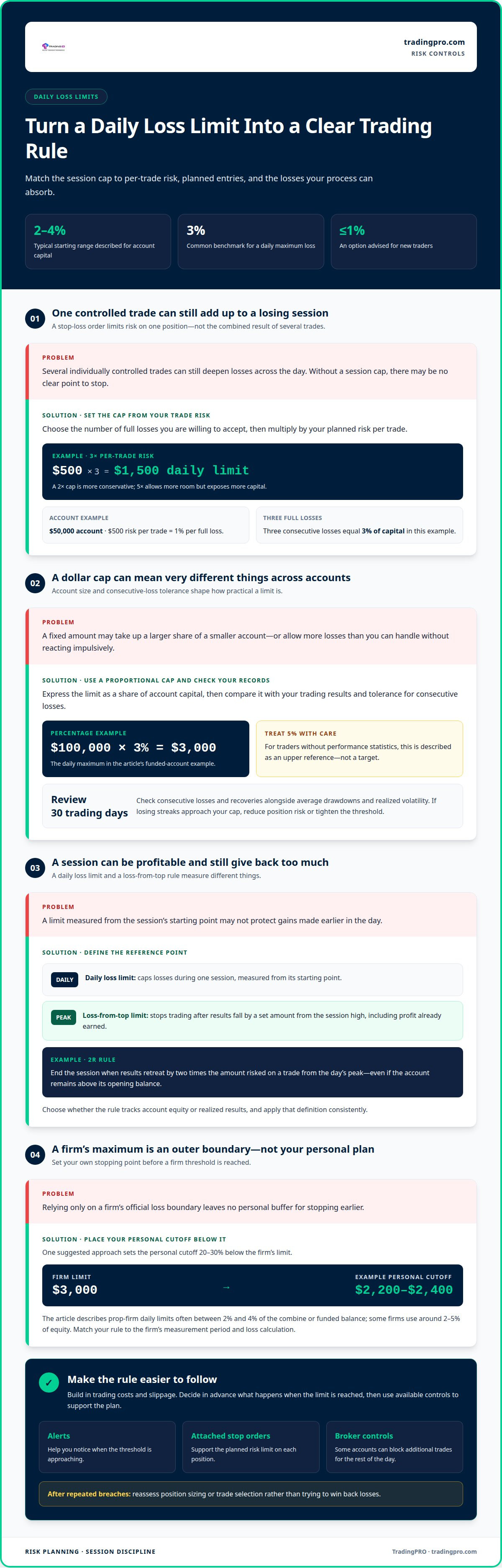
A daily loss limit only protects your account if it’s clear and actionable. To decide how to set daily loss limits on a trading account, start with a cap equal to two or three full losing trades, typically 2 to 4 percent of account capital; new traders may choose 1 percent or less.
It’s sensible to stop after losses begin to stack up, but a single cap won’t suit every trader. Your per-trade risk, trading results, and ability to absorb consecutive losses all matter. This guide explains who daily loss limits and loss-from-top rules can suit, how to choose a practical cap, and what to do when you reach it.
You’ll also learn how automated cutoffs, attached stop orders, and broker-configured account limits can help interrupt a difficult session. Some broker accounts let you set a limit that blocks additional trades for the rest of the day, adding a useful layer of control alongside your own trading plan.
Key Takeaways
- Translate your planned per-trade risk into a session cap, then check whether it leaves room for the number of trades you intend to take.
- Use your own trading record and tolerance for consecutive losses to judge whether a daily stop or a loss-from-top rule fits your approach.
- Build in trading costs and slippage, and decide in advance what you’ll do when the limit is reached.
- Combine alerts, attached stops, and available broker controls to make your risk rules easier to follow during a fast-moving session.
- Review repeated limit breaches as a signal to reassess position sizing or trade selection, rather than trying to win back losses.
Are Loss-From-Top and Daily Loss Limits For Everyone?
A daily loss limit caps losses during one trading session. A maximum drawdown limit tracks a decline from an account peak over a broader period. Daily limits stop trading when realized losses and, where included, open losses reach a preset cap, helping prevent further trades from deepening that session’s losses.
Neither rule suits every strategy in the same way. Base your cap on account size, planned risk per trade, and how consecutive losses affect your decisions.
Daily Limits and Trade Stops
A stop-loss order limits the planned risk on one position, while a daily loss limit caps combined losses across a session. Several individually controlled trades can still add up to a damaging day. Set each trade’s stop first, then choose a daily cap that allows for your planned trades but ends a losing session.
Start with the amount you can lose on one trade, then multiply it by the number of full losses you’re willing to accept in one session. A common approach sets the daily cap at 3× per-trade risk. For example, with $500 at risk per trade, that formula produces a $1,500 daily limit. A 2× cap is more conservative; 5× allows more room but exposes more capital.
Account size helps show what that dollar amount represents. If a $50,000 account risks $500 per trade, each full loss equals 1% of capital, and three consecutive losses equal 3%. That calculation makes the trade-off visible: the same dollar cap has a different impact on a smaller account.
Loss-From-Top and Drawdown Limits
A loss-from-top limit stops trading after results fall by a set amount from the session’s high point, including profit already earned. Unlike a daily loss limit measured from the session’s starting point, it protects gains made during the day. A 2R rule, for example, ends the session when results retreat by two times the amount risked on a trade from the day’s peak.
This approach can matter after a profitable run, when a trader may feel tempted to keep trading. If the session rises and then gives back 2R, the loss-from-top rule triggers even if the account remains above its opening balance. Choose whether your limit tracks account equity or realized results, then apply that definition consistently.
Planned trade size determines how quickly a daily cap can be reached. With a 0.8% daily limit and 0.2% risk per trade, four consecutive full losses reach the cap. At 1% risk per trade, three consecutive full losses total 3% of capital. These examples show why a cap must account for both per-trade risk and the number of planned entries.
Use recent results to judge whether the planned allowance fits your approach. If three consecutive losing trades would trigger panic or impulsive recovery trades, a three-loss cap may be too wide for your current process. Set a tighter limit, define what happens when it triggers, and review whether frequent triggers point to oversized risk or weak trade selection.
What is the maximum daily loss for day trading?
There’s no single maximum that suits every account or strategy. A common benchmark is 3% of account capital, while new traders are advised to use 1% or less. Deciding how to set daily loss limits on a trading account starts with matching the cap to your account size, trading record, and tolerance for consecutive losses.
Percentage-Based Account Limits
A percentage-based daily limit defines the session’s maximum loss as a share of account capital. This structure keeps the threshold proportional as account value changes. For a $100,000 funded account with a 3% limit, the maximum is $3,000. Some guidance suggests traders without performance statistics start at no more than 5% of account value, but that is an upper reference, not a target.
Use your trading record to refine the setting. Review consecutive losses and recoveries across the last 30 trading days, then compare them with average drawdowns and realized volatility. A hypothetical $7,500 account losing $460 in one day would be down more than 6%. If your records show losing streaks approaching your cap, reduce position risk or tighten the threshold.
Personal and Firm Limits
A personal limit below a firm’s official threshold gives you room to stop before reaching its boundary. One suggested approach places the personal cutoff 20-30% below the firm’s limit. For a $3,000 firm limit, the example personal cutoff is $2,200-$2,400. This buffer makes the personal rule an active control, rather than relying on a firm’s maximum as your daily target.
Prop firm daily limits are described as often falling between 2% and 4% of the combine or funded balance, while some firms use around 2-5% of equity. Match your own limit’s measurement period and loss calculation to the firm’s structure. When considering how to set daily loss limits on a trading account, treat a firm’s threshold as an outer boundary, not a personal plan.
Layer controls beyond one session. A 6% monthly loss limit means stopping for the rest of the month once cumulative losses reach 6%. On a $10,000 balance at the beginning of the month, that equals $600. Other proposed monthly thresholds include 4% and 8%, so use your drawdown tolerance and trading record to select a level.
One example sets the weekly loss limit at twice the daily cap. Pairing weekly and monthly thresholds can help identify repeated losses before they build into a larger drawdown. Use a trading account registration when you’re ready to put your defined risk structure into practice.
Are There Ways to Automate the Application of Loss-Limits and Orders?
Automation can turn a written risk rule into a practical trading control. Combine alerts, attached stop orders, and account settings to help enforce your maximum loss threshold.
Alerts and Broker Controls
An alert warns you as losses approach a preset threshold, while an account control can block new entries once the limit is reached. The difference matters: you must respond to an alert, but an account cutoff can enforce the rule automatically. Set alerts below your maximum so you have time to act before reaching the boundary.
Some broker accounts let traders configure a daily loss limit that prevents additional trades for the rest of the day. Make sure the cutoff uses the same session and loss measure as your plan. If it includes open losses, for example, your available balance can change before you close a position.
Mechanical and Automated Enforcement
Mechanical enforcement means following a preset action whenever a defined condition occurs; automated enforcement uses platform controls to carry it out. Both reduce reliance on decisions made under pressure. Closing open positions and stopping when the cap is hit is a mechanical rule; an account lockout that blocks new entries is automated.
Attach a stop when entering a trade, using a bracket order where available, so the position has a defined exit. For example, a trader buying shares at $30 and aiming to limit loss to about $3 per share could place a sell-stop order at $27. The order manages that position, while the daily cutoff governs total session losses.
Build enforcement in layers. First, set the account’s maximum daily loss. Next, place a stop with each entry. Then decide what you’ll do if the platform only sends an alert: close open positions, cancel working orders, and step away from the screen. These steps make the rule concrete, even without an automatic lockout.
A prop-style account may enforce its daily threshold through automatic liquidation and a lockout until the next session. This can prevent new entries after the limit triggers, but it doesn’t replace careful position sizing or stop placement. Keep your own threshold below any firm-enforced maximum, so the account control remains a backstop rather than your first warning.
Test the setup before relying on it in a live session. Confirm that the alert uses the intended account size, percentage, session reset, and loss calculation. Check that attached stops match your planned risk, and find out whether the account control blocks new trades or also closes open positions. These settings determine what happens when the threshold is reached.
Decide what a trigger means before trading begins. Record the loss, stop entering trades, and review the session after the next reset. If the cutoff activates more than a few times a month, reassess your risk per trade or trade selection instead of automatically raising the maximum.
How exceeding a limit can compound losses
A limit that’s too tight can stop trading before a strategy has room to work; one that’s too loose can let a poor session deepen. Set the threshold around your planned risk and trading results, then follow it consistently. Breaching it can turn a manageable loss into a larger drawdown and make later recovery harder.
Losses compound because recovery requires a larger gain than the percentage lost. A 3% account loss needs about a 3.1% gain to return to breakeven. A 20% loss needs a 25% gain, while a 50% loss needs a 100% gain. Protecting capital during a single day can therefore reduce the damage a trader must later overcome.
R values make daily results comparable across positions. One R represents the amount planned at risk on a trade, so a loss of 1R means the trade lost that amount. Record each result in R, then total the session. A 2R loss-from-top rule, for example, ends trading when results fall 2R from the day’s high point.
Use the same accounting basis for every threshold. Floating losses are unrealized losses on open positions; whether they trigger a limit depends on how the account or platform calculates that limit. Decide whether your rule uses equity, including open profit and loss, or closed trades only. Include commissions too: a session with $200 in commissions is a −$200 day, even if price P&L is breakeven.
Risk management also means deciding what happens when the limit triggers. Stop entering trades, close or manage open positions according to your plan, and log the result. Slippage and trading costs can make the effective cap tighter than its stated amount, so leave room for them rather than treating the displayed threshold as exact.
Discipline matters most after losing trades, when a trader may try to recover quickly. A cascading bad day can cost 10× what a normal bad day would cost. If you reach the limit, don’t raise it mid-session. Review the trades afterward, then adjust the next session’s position sizing only when your records support a change.
A limit should reflect how your strategy behaves, not just your account balance. If it triggers more than a few times a month, your risk per trade may be too large or your setups too loose. If it rarely lets planned trades develop, consider whether the threshold is unnecessarily tight. Keep the rule stable during a session, then use your results to refine it between sessions.
Broker-configured daily loss limits
A broker-configured limit can block additional trades after losses reach a preset session threshold. Treat it as a backstop to your personal risk plan, not a substitute for one.
Automatic Limits and Trading Lockouts
Some broker accounts let traders set a daily loss limit that prevents new trades for the rest of the day. Prop-style accounts may also enforce the threshold through automatic liquidation and a lockout until the next session. These controls can interrupt revenge trading, but their calculation method determines when they activate.
Which brokers offer automatic daily loss limits or trading lockouts? Some broker accounts provide configurable daily cutoffs, while prop-style accounts may enforce limits through liquidation and lockouts. Controls vary by account, so distinguish a warning alert from a rule that actually blocks new orders.
Before relying on a control, identify what it measures: realized losses, open-position losses, or both. Also note when the session resets and whether commissions count. A platform that only blocks new entries may leave existing positions open, so decide how you’ll manage them if you reach the maximum loss.
Configuring Limits Across Markets
For stocks, options, forex, and futures, configure the same core rule: define the session, loss calculation, threshold, and action at the limit. Then account for how position size and contract or share exposure affect each trade’s potential loss. This keeps the daily cap meaningful across different instruments.
How should you configure limits across stocks, options, forex, and futures? Set an account-level maximum, then align each position’s stop with its share, contract, or trade exposure. Check whether the platform aggregates losses across instruments or applies separate limits, so activity in one market doesn’t fall outside your intended cap.
Set your personal cutoff below any firm-enforced maximum, leaving room for execution costs or open losses. If a firm’s rule uses account equity while your platform tracks closed trades, the thresholds may trigger at different times. Match the measurement basis where possible, and don’t treat a displayed percentage as interchangeable with a dollar cap.
Test the rule with a hypothetical session before trading. For example, simulate a losing position followed by another entry and confirm whether the account blocks the next order at the intended threshold. Record the reset time and response procedure alongside your plan. This setup check can make the limit easier to follow under pressure.
Build your trading routine around a clear risk plan, then open a trading account when you’re ready to put it into practice.
TradingPRO: Social Trading / Copy Trading
TradingPRO’s Social Trading / Copy Trading lets you replicate other traders’ strategies while keeping risk limits central to your plan. It may suit traders who want to follow another approach, but copying trades doesn’t remove market risk or replace a daily loss cap.
Set your own maximum loss before participating, and decide how you’ll respond if losses approach it. Keep position sizing aligned with your account and risk tolerance. Review copied activity against your rules, and stop trading when you reach your preset threshold rather than letting a copied strategy override your plan.
If you’d like to explore whether Social Trading / Copy Trading fits your approach, contact TradingPRO.
Make Your Risk Plan Part of Every Session
A trading rule is useful when it guides your decisions before emotions take over. Write down what you’ll do before your next session, including how you’ll respond if conditions change or a trade behaves differently than expected. Keep the plan clear enough to follow under pressure.
The key to how to set daily loss limits on a trading account is to apply your chosen rules consistently, then review whether they still fit your approach. Make changes deliberately between sessions, not in reaction to a winning or losing trade. That discipline gives you a steadier foundation for future trading.
TradingPRO offers Rookie Account, Micro Account, and Pro Account options. Consider which account aligns with your trading approach and risk plan, then take the next step at your own pace.
Contact TradingPRO to discuss your trading controls and move forward with a clearer plan.
Frequently Asked Questions
How big should the cap be?
Choose a cap that your planned trade risk and recent results can support. As a starting framework, set it around two or three full losing trades, then review whether your trading record can absorb that sequence. Looking at consecutive losses and recoveries over the last 30 trading days can help reveal whether the allowance fits your strategy. A cap should guide decisions, not encourage you to use all available risk.
Should I include commissions in the daily loss calculation?
Yes, include commissions when assessing the session’s actual result. For example, a day with $200 in commissions is a −$200 day even if price profit and loss is breakeven. Trading costs reduce account performance just like trading losses do, so leaving them out can make your remaining risk look larger than it is. Use the same cost treatment in your records and daily calculation for a consistent view.
What Other Strategies Can Help in Limiting Losses?
Pair the daily cap with smaller position risk, an attached stop order, and a clear end-of-session routine. New traders may start with 0.1% or 0.25% of account capital at risk per trade, or less. After a loss, a five-minute timer can create a pause before another decision. If the daily stop is reached, flatten positions as planned and write a journal entry instead of seeking a quick recovery.
What actually enforces the cutoff?
You can enforce your cutoff through your own routine or an account control. An alert tells you the threshold is near, but you still need to act. Some broker accounts allow a daily loss setting that blocks additional trades for the rest of the day. Prop-style accounts may automatically liquidate positions and lock trading until the next session. Know whether the control blocks new entries, closes positions, or only sends a warning.
How much should a trader set as a daily loss limit?
For day trading, one suggested ceiling is 3% of account capital in a single day. New traders are advised to use 1% or less. Use the lower end if your trade history is limited or consecutive losses are difficult to manage. Once you have performance records, compare the cap with your actual losing streaks and drawdowns. The goal is a limit that your plan can follow through different market conditions.
How to calculate a daily trading loss limit based on account size?
Multiply account capital by your chosen daily-loss percentage, or multiply planned risk per trade by the number of full losses you’ll allow. Recalculate if account equity or planned trade risk changes, and use one consistent account value as your calculation base.
How to set a daily loss limit in a brokerage platform?
Open the account’s risk or trading-control settings, if available, and define the loss amount, session reset, and action at the threshold. Choose whether the calculation includes open-position losses, then check how commissions are handled. Save the rule before trading and compare the displayed value with your own calculation. If the platform only offers alerts, decide in advance what action you’ll take when one appears.
Do daily loss limits include commissions, fees, and unrealized losses?
They can, but the calculation depends on the account or platform settings. Include commissions in your own performance tracking because they reduce the session’s result. Individual controls may treat fees and unrealized losses differently. For instance, a platform measuring equity can reflect open-position profit and loss, while a realized-only calculation may not. Identify the calculation basis before relying on a cutoff.


