




- Published on: 2026-10-06 17:09:41
Trading on the Go: Practical Tips for Safer, Smarter Mobile Trading

More phone checks don’t make you a better trader. A clear routine does. These trading on the go tips will help you stay deliberate when a small screen, unreliable connection, or fast-moving market makes it tempting to rush.
Trading away from your computer can be convenient, but convenience has limits. A dropped connection can interrupt research or order management. A compact display can make charts and order details harder to review. Constant alerts can also pull you away from a considered plan. You don’t need to react to every market move; you need a process that keeps each action intentional.
This guide explains how to prepare before opening a trading app, protect account access, and verify order details before submitting them. You’ll also learn when to pause until your connection is stable or move to a larger screen for a closer review. Use these steps to build a repeatable mobile trading routine, then consider whether TradingPRO’s Rookie Account fits your intended approach.
Key Takeaways
- Use these trading on the go tips to make mobile trading part of a planned routine, not a reason to check markets more often.
- Review market context and decide what actions you intend to take before leaving a stable workspace.
- Match the task to the screen: use a phone for straightforward monitoring, and return to a larger display when research or chart review needs more attention.
- Before submitting an order, confirm the instrument, direction, order type, size, and intended risk.
- Before committing capital, understand the account terms and risks, and choose an account that fits your intended trading approach.
Trading on the Go: What Mobile Trading Can, and Cannot, Do
Trading on the go means accessing market research or managing trades away from a desk, usually through a mobile device. It can keep selected tasks within reach, but convenience doesn’t remove market risk, execution risk, or the possibility of financial loss. A screen in your pocket provides access; it doesn’t replace preparation.
Mobile access is a way to use a trading platform away from your desk; a mobile-first trading strategy is a plan built around phone-based decisions. The first can support a considered approach. The second still needs clear rules, risk limits, and a process you can follow. An electronic trading platform provides a way to access markets and submit transactions, but the tool itself can’t decide whether a trade fits your plan.
Which trading tasks work well on a phone?
A phone can be useful for focused tasks such as reviewing a watchlist, checking an open position, or seeing a relevant alert. Monitoring means checking whether a planned condition needs attention, not reacting to every price change. If a chart needs close analysis or research requires comparing several sources, a larger screen can make details easier to review and help you keep the context in view.
When should you pause instead of placing a trade?
Pause if you’re distracted, rushed, tired, or unable to confirm what an order will do. Uncertain connectivity is another reason to avoid time-sensitive actions: a delay or interruption can leave you unsure whether an instruction was submitted or what its status is. Don’t repeat an action just because the screen hasn’t updated. Regain a reliable connection and check the available order information first.
Use these trading on the go tips as boundaries, not prompts to trade more often. Before acting, make sure the decision matches your plan and that you can review the relevant details clearly. If you can’t, wait until you have a stable connection or return to a larger screen. An open market doesn’t create an obligation to trade. Sometimes the most disciplined move is to leave the phone in your pocket and let your plan stand.
Prepare Before You Leave: Build a Reliable Mobile Trading Setup
A dependable mobile routine starts before you step away from a stable workspace. Review the relevant market context while you can see the information clearly, decide what would justify action, and make sure your device and connection are ready. Preparation belongs before a mobile trade because your phone should support a considered plan, not create one under pressure.
Run this pre-session checklist in order:
- Plan: Review market context and note the conditions that matter to your strategy.
- Device: Charge your phone, update its software, and check that the screen and controls are working as expected.
- Connection: Confirm you have a reliable connection in the places where you expect to monitor or manage trades.
- Account access: Make sure you can sign in securely without relying on a shared device or unfamiliar network.
- Intended actions: Decide what you may need to review or manage, and what conditions would mean waiting instead.
Secure your device and account access
Protect your device with a passcode and keep its software updated. Use unique credentials for your trading account, and enable multifactor authentication if the trading service provides it. Avoid entering account details on shared devices or over unfamiliar networks. These habits reduce avoidable access risks, but don’t eliminate every security threat. Keep credentials private and don’t save them where someone else can easily access them.
Plan orders and alerts before the day gets busy
Record your market thesis, the conditions for considering an entry, and the conditions that would prompt an exit. Set notifications only for information relevant to your plan; a stream of price updates can distract rather than inform. Treat an alert as a cue to review the situation, not an instruction to trade. For foundational forex concepts, explore this beginner forex trading guide.
Good trading on the go tips make your phone a controlled extension of your routine. If you’re still learning, take time to understand the risks and account terms before committing capital. TradingPRO offers Rookie, Micro, Pro, and Scalp accounts for different trading styles and experience levels. You can review TradingPRO account options as part of your preparation.
Mobile vs Desktop Trading: Know the Limits Before You Act
A phone is convenient, but it isn’t ideal for every decision. A small display can make chart context harder to assess and order details easier to overlook, especially when you’re switching between screens or working in a hurry. That doesn’t make mobile trading inherently unsafe, or desktop trading automatically safer. The better choice depends on the task, your surroundings, and whether you can review the information you need.
| Task | Phone | Larger screen |
|---|---|---|
| Monitoring | Convenient for a focused position check or watchlist review. | Useful when you want more information visible at once. |
| Research | Can work for a quick check, but switching between sources may hide context. | Often easier for comparing information and reviewing several charts. |
| Order entry | Can suit a straightforward action when every field is easy to inspect. | May make it easier to review order details before submission. |
| Connection reliability | Depends on your current network and surroundings. | Also depends on the connection in use; a larger screen alone doesn’t ensure stability. |
Use mobile for monitoring; use a larger screen for complex review
A quick check of an open position is different from weighing several charts, timeframes, or pieces of market context. If a decision depends on details that are difficult to inspect on your phone, switch to a larger screen or wait until you can review them properly. Don’t let the device set the decision. Your trading plan should determine what information matters and whether the conditions for action are met.
Protect decisions when connectivity or context changes
A screen that hasn’t refreshed doesn’t tell you whether an order was received, rejected, or remains pending. Don’t tap submit repeatedly when the result is unclear. Restore a reliable connection, then check the order status or available order records before deciding what to do next. If you can’t confirm the status or review the situation clearly, pause trading until you can.
Good trading on the go tips include knowing when not to use your phone. Use mobile access for tasks you can handle clearly; move to a larger screen when the decision calls for deeper review. The goal isn’t to trade from every device. It’s to follow the same considered plan across them.
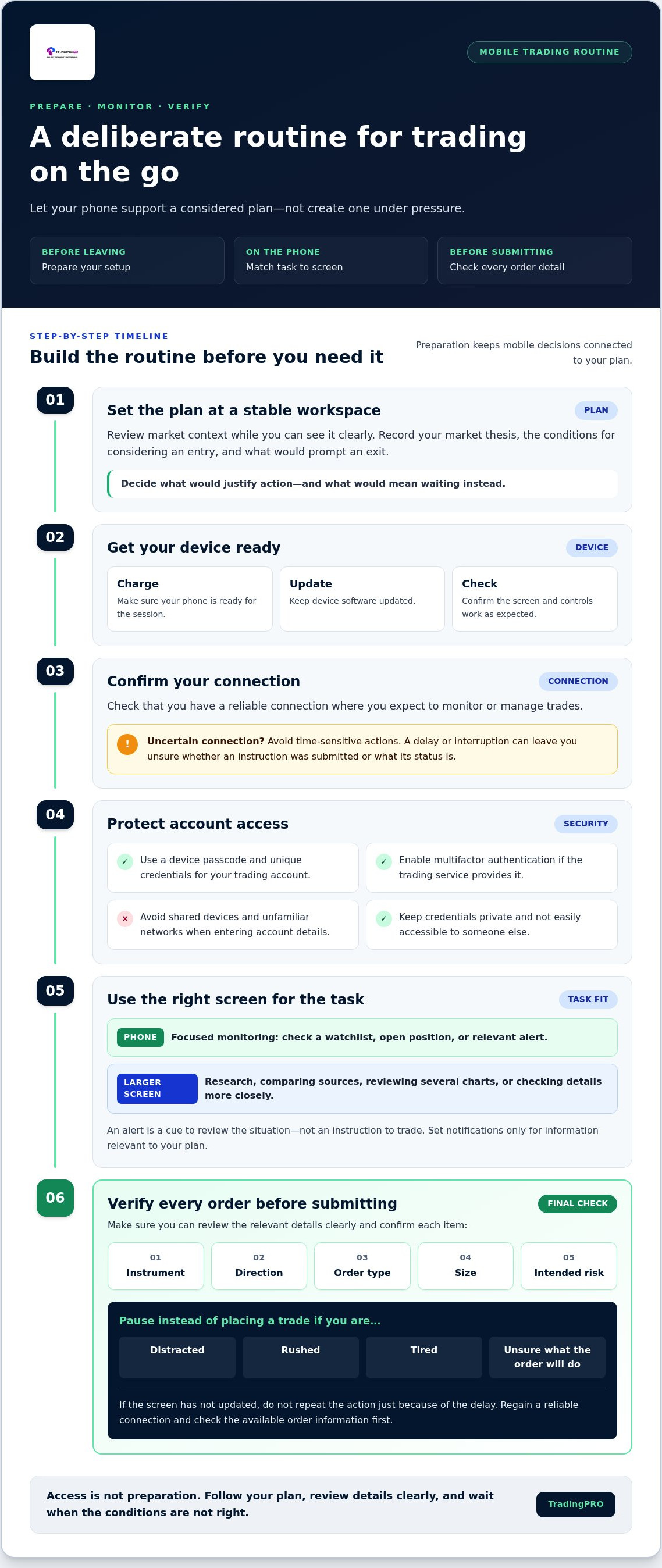
A Practical On-the-Go Trading Checklist for Before, During, and After
A repeatable routine keeps mobile decisions tied to your plan instead of whatever grabs your attention in the moment. Split the process into three stages: define your conditions before trading, verify each action while trading, and review your decisions afterward. These trading on the go tips are designed to help you stay deliberate, not to encourage more frequent trades.
Before trading: define the plan and the stop conditions
Set your boundaries while you can focus. Identify the market conditions that must be present before you consider an entry, and decide what would make you wait or end the session. Set your risk limits in advance, before messages, movement, or other demands divide your attention.
- Confirm the market context and the conditions your plan requires.
- Decide what would invalidate the setup or mean pausing for the day.
- Make sure you have enough time and focus to review and manage any action you take.
During trading: verify, act, and confirm
Before submitting an order, check each detail on the screen: the instrument, direction, order type, size, and intended risk. If any field is unclear or hard to inspect, stop and review it on a larger screen. Don’t trade while driving, working, or doing anything else that prevents you from giving the decision your full attention.
After submitting, check the order status through the platform. A delayed screen update isn’t confirmation that an order failed, so avoid repeatedly resubmitting while its status is uncertain. If you can’t reliably review the status or your connection is unstable, pause rather than guess.
After trading: record and review
Make a brief journal entry after the decision, whether you placed a trade or chose to wait. Note the market context, your rationale, whether your conditions were met, and any distraction or connectivity issue that affected your process. Later, look for patterns: did alerts pull you away from your plan, or did small-screen review make a detail harder to see? Use those observations to refine your routine, rather than judging a decision only by its outcome.
Build the checklist into a routine you can follow consistently. TradingPRO offers several account options, including the Rookie Account, for traders considering how an account fits their approach. You can review TradingPRO account options alongside your planning.
Turn Mobile Trading Tips into a Consistent Account and Trading Routine
The strongest mobile routine is one you can repeat whether you’re at home, commuting as a passenger, or away from your usual workspace. Preparation, secure account access, careful order review, and deliberate pauses all have a place in that process. The aim isn’t to trade more often or guarantee better results. It’s to make decisions according to a plan, even when your phone makes market access feel immediate.
Match your account choice to your experience and approach
Choose an account only after considering your experience, goals, and the trading approach you understand. Before committing capital, read the account terms and make sure you understand the risks involved. Don’t assume a particular account automatically suits your needs because of its name or because you plan to trade from a phone. Beginners exploring their options can review TradingPRO’s Rookie Account and consider whether it aligns with their intended approach.
Take the next step without rushing into live trades
Turn your routine into a sequence: prepare your plan, secure your device and account access, check the connection, and identify the situations where you’ll wait or return to a larger screen. Before submitting an order, review its details and confirm its status afterward. If you can’t focus or verify what’s happening, pause. Mobile access can make trading more convenient, but it can’t remove market or financial risk or promise a positive outcome.
Keep your process simple enough to follow consistently. After each trading session, note whether you stuck to your plan and whether anything, such as a distracting alert or a small-screen limitation, made review harder. Use that observation to refine the routine before your next session. The value of trading on the go tips is in supporting measured decisions, not replacing judgment or a sound understanding of risk.
TradingPRO offers Rookie, Micro, Pro, and Scalp accounts, along with social trading and copy trading. As you consider your next step, compare your intended approach with the account terms and risks.
Make Every Mobile Trading Decision Count
The strongest trading on the go tips come down to a repeatable routine: prepare before you leave, protect account access, and verify order details before acting. Use your phone for tasks you can review clearly, and pause when you’re distracted, the connection is uncertain, or a larger screen would help you assess the decision.
Mobile access can make trading more convenient, but it can’t remove market risk or guarantee results. Keep your decisions grounded in a plan you understand, and learn the terms and risks of an account before committing capital. TradingPRO offers Rookie, Micro, Pro, and Scalp account tiers, as well as social trading and copy trading. Consider which account aligns with your experience and intended approach.
Ready to explore TradingPRO’s account options? Create your TradingPRO account and build your routine with care. Stay deliberate, keep learning, and let your plan lead.
Frequently Asked Questions
Is trading on the go safe?
Trading on the go can be managed more carefully with secure account access and a clear routine, but it isn’t risk-free. Market movements, execution conditions, distractions, and connection problems can still affect decisions. Protect your device with a passcode and updated software, use unique credentials, and enable multifactor authentication if available. Pause if you can’t review the situation or order details clearly. Mobile convenience doesn’t guarantee a safe trade or a positive outcome.
Can you trade effectively using only a mobile phone?
You can use a phone for focused tasks, such as checking a watchlist or reviewing a position, but it may not suit every part of your process. A small screen can make it harder to compare research, assess chart context, and inspect order fields. Let your plan, not the device, guide decisions. If analysis requires information that’s difficult to see, wait until you can use a larger screen rather than forcing a rushed choice.
How do I protect my trading account when using public Wi-Fi?
Avoid signing in to your trading account on public Wi-Fi when you can use a trusted private connection instead. If you must access an account away from home, don’t use a shared device, keep your phone’s software updated, use unique credentials, and enable multifactor authentication where available. Avoid saving passwords on devices others can access. If the network seems unfamiliar or unreliable, wait until you have a connection you trust before entering account details.
What should I check before placing a trade on my phone?
Before submitting, confirm the instrument, direction, order type, size, and intended risk. Check that the details match your plan and that the screen displays each field clearly. If a field is unclear, don’t guess or rush. Review the market context and confirm you have enough time and focus to manage the decision. These trading on the go tips support a deliberate process, but they can’t remove market risk or ensure a particular result.
What happens if my connection drops while a trade is open?
Don’t assume that an open position has closed or that a submitted order was canceled just because your screen stops updating. Once you have a reliable connection, sign in securely and check the order and position status through the trading service before taking further action. Avoid resubmitting an order while its status is uncertain. If you can’t confirm what’s happening, pause until you can review the available order and account information.
Are mobile trading alerts enough to manage a position?
No. Alerts can prompt you to review a market or position, but they can’t replace your trading plan or confirm that a particular action is appropriate. Notifications may be delayed, missed, or distracting, so don’t rely on them as your only way to monitor risk. Set alerts around conditions relevant to your plan, then review the available information yourself. If you can’t check the situation clearly, avoid making a rushed decision based only on an alert.
Should beginners start trading on a phone?
Beginners can use a phone for limited, planned tasks, but should first learn how trading works and understand the risks and account terms before committing capital. A small screen and frequent notifications can make it harder to review context or resist impulsive decisions. Build a routine that includes preparation, order checks, and clear reasons to wait. TradingPRO offers a Rookie Account alongside other account options, but choosing an account doesn’t remove trading risk.


