




- Published on: 2026-08-07 10:30:37
Login TradingPRO: The Complete 2026 Access & Security Guide

Your ability to dominate the 2026 markets depends on more than just a strategy; it requires an unbreakable link to your execution engine. When you initiate your login tradingpro session, you aren't just opening a portal. You're activating an elite command center designed for precision and power. You've likely felt the sting of a "Server Not Found" error during a high-volatility session or the confusion of juggling different credentials for the Client Portal and MT5. It's a friction you don't have time for in a landscape where every millisecond translates to your bottom line.
This guide ensures you never lose a second of market movement again. You'll master your access across every device, resolve connection hurdles instantly, and fortify your high-performance environment with mandatory 2FA security. We'll break down the exact steps to sync your Rookie, Pro, or Scalp accounts seamlessly. Whether you're hunting for forgotten MT4 server names or transitioning between mobile and desktop, you're about to streamline your path to the Trade Hub. Get ready to secure your edge and trade with the confidence of a global leader.
Key Takeaways
- Master the Client Portal as your ultimate command center to manage funds and account security with elite precision.
- Streamline your login tradingpro experience by distinguishing between portal credentials and platform-specific terminal access for MT4 and MT5.
- Eliminate downtime by instantly resolving "Invalid Account" errors through correct server selection and credential validation.
- Fortify your trading environment with institutional-grade MFA protocols and benefit from the safe-haven reliability of regulated infrastructure.
- Move beyond simple access to full market readiness by leveraging the Social Trading ecosystem once your high-speed connection is established.
Mastering the TradingPRO Client Portal Login
Your journey to market dominance begins with a secure entry point. The TradingPRO Client Portal serves as your strategic command center, a centralized hub where you manage every facet of your account infrastructure. This is the foundation of your fund security. It is here that you handle deposits, withdrawals, and leverage adjustments with total precision. When you perform a login tradingpro action, you are accessing a sophisticated ecosystem designed to protect your capital while providing instant access to the global markets.
A critical distinction to remember is the difference between your Portal credentials and your Trading Terminal credentials. Your Portal password acts as the master key to your financial vault and personal data. Your MT4 or MT5 login, however, is purely for executing trades on electronic trading platforms. Maintain this separation to ensure institutional-grade security. Never compromise your account by using public or unsecured networks. If you ever stall at the gateway, our 24/7 multilingual support team is integrated directly into the login interface, ready to provide immediate solutions for our Rookie, Pro, and Scalp account holders.
Step-by-Step Dashboard Access
Securing your dashboard access is a streamlined process. Start by navigating to the TradingPRO secure registration and login page. Enter your registered email address and your unique portal password. Before you proceed, verify the URL in your browser's address bar. Ensure you are on the official, encrypted domain to safeguard your data against phishing attempts. This simple check is your first line of defense in a high-stakes environment. Once inside, you will find a frictionless interface optimized for speed and clarity, allowing you to move from management to execution in seconds.
Recovering Lost Credentials Securely
Momentum shouldn't stop because of a forgotten password. Utilize the "Forgot Password" protocol for an immediate, automated reset sent to your verified email. To maintain our safe-haven security standards, you must complete specific identity verification steps. This ensures that only you can regain control of your assets. For more complex recovery needs, reach out to our team. We pride ourselves on a quick 15 to 20 minute verification process; we'll get you back into the action without unnecessary delays. Keeping your login tradingpro credentials secure is our priority, but restoring your access quickly is our promise to every professional trader on our platform.
Connecting to MT4 and MT5 Trading Terminals
Bridging the gap between your Client Portal and the actual market requires a precise technical handshake. While your portal handles the administrative side of your wealth, the MetaTrader 4 (MT4) and MetaTrader 5 (MT5) terminals serve as your high-performance engines. Successfully completing a login tradingpro session on these platforms involves more than just entering a password. It requires aligning your unique account number with the specific institutional server assigned to your account type. This architecture ensures that your trades are routed through the fastest possible liquidity paths, minimizing slippage and maximizing execution quality.
The most frequent obstacle traders face is the "Invalid Account" error. This message rarely indicates a broken account; instead, it usually signals a mismatch between your credentials and the selected server. When you attempt to access your Pro or Scalp account, the terminal must ping the exact server where your data resides. Selecting the wrong server name will result in a failed connection. Beyond simple access, prioritizing the server with the lowest latency, or "ping," gives you a competitive edge. Speed is life in the markets. You can monitor your real-time terminal performance and connection stability through the Trade Hub, which acts as a diagnostic layer for your trading environment.
Locating Your Server Information
To find your specific connection details, navigate to the "My Accounts" section within your Client Portal. Here, you will find clear labels for your live and demo servers. It's vital to distinguish between these environments, as a "Live" account will never authenticate on a "Demo" server. Precise server synchronization is the catalyst for ultra-low latency execution, ensuring your orders hit the market at the exact price you intend. Always double-check these labels before attempting to connect.
Mobile vs. Desktop Login Procedures
Your trading strategy shouldn't be tethered to a desk. Configuring the TradingPRO mobile app allows you to maintain market agility, providing a streamlined version of the login tradingpro process for those on the move. For deeper technical analysis and high-frequency execution on Scalp accounts, syncing your desktop terminal is essential. Desktop versions allow for more robust charting and the management of multiple account logins within a single MetaTrader instance. This modularity lets you switch between a Micro account for testing and a Pro account for heavy lifting in seconds. Always follow best practices for Protecting Your Online Investment Accounts by ensuring your devices are secure before logging in. If you're ready to deploy your strategy on our elite infrastructure, access your dashboard now to get started.
Fortifying Your Account: MFA and Security Protocols
Elite performance is impossible without absolute security. You are here to dominate the markets, not worry about the integrity of your command center. Every time you perform a login tradingpro action, you are stepping into a fortified environment backed by global regulatory standards. TradingPRO International Limited operates under the rigorous oversight of the Financial Services Commission (FSC) of Mauritius (license GB23202513) and the Financial Sector Conduct Authority (FSCA) of South Africa (FSP 49624). This institutional stability provides a safe-haven feel, allowing you to focus entirely on execution while we maintain the highest protocols for your capital protection.
Enabling Multi-Factor Authentication (MFA)
Security is a shared responsibility. While our infrastructure is robust, your first line of defense is Multi-Factor Authentication (MFA). We mandate 2FA for all accounts in 2026 to ensure that only you can access your funds. Integrating Google Authenticator or SMS codes adds an impenetrable layer of defense against unauthorized access. For high-balance Pro and Scalp accounts, MFA is non-negotiable. If you change mobile devices, update your settings immediately within the portal. This prevents any friction when you need to execute a critical login tradingpro sequence during market volatility.
Monitoring Active Sessions and IP Logs
Proactive monitoring is the hallmark of a professional trader. Within your portal, you can review your entire login history and active sessions. This transparency allows you to spot and terminate any unfamiliar connections instantly. We utilize session timeouts as a tactical tool to protect your capital if a terminal is left unattended. Beyond basic login security, our infrastructure includes Negative Balance Protection, ensuring your losses never exceed your deposits. This is the safety net that allows you to trade with maximum aggression and confidence.
For elite traders requiring even tighter control, we offer IP whitelisting. This restricts account access to specific, authorized network addresses, effectively locking out any external threats. By combining these advanced protocols with our regulated oversight, we provide the ultimate fortress for your trading career. Your success is built on this foundation of trust and technical excellence. Secure your account today and trade with the peace of mind that only a global leader can provide.
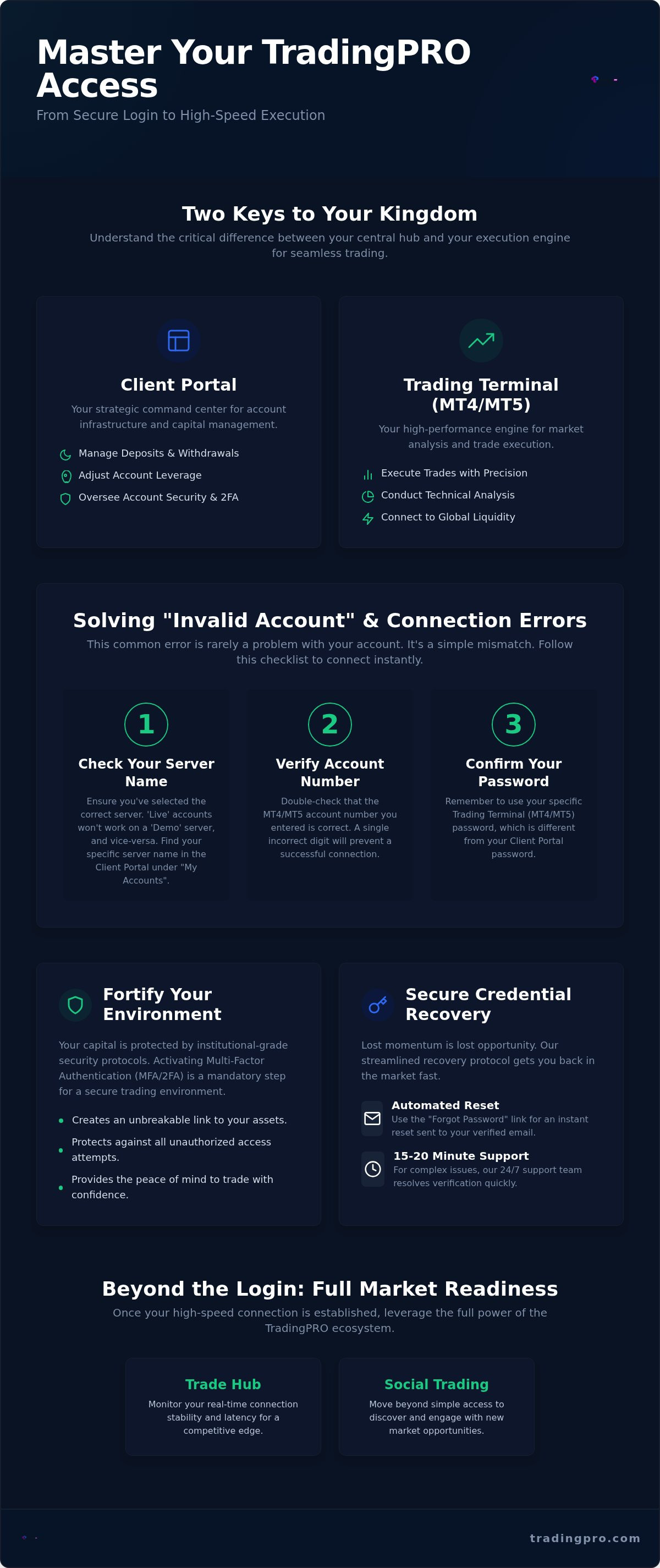
Solving "Invalid Account" and Connection Errors
Volatile markets don't wait for technical delays. When you're ready to execute, seeing an "Invalid Account" message can feel like a roadblock to your momentum. This error is the single most frequent frustration traders encounter, yet it's rarely a sign of a broken account. Most often, it's a simple synchronization mismatch that you can resolve in seconds. Distinguishing between a software bug and a credential error is the first step toward reclaiming your elite trading status. If these steps don't restore your login tradingpro session immediately, our 24/7 multilingual support team is standing by to handle technical escalations with institutional speed.
Diagnosing "Invalid Account" Messages
Precision is paramount when entering your credentials. Start by verifying that you're using your specific trading terminal password rather than your master Client Portal password. These are distinct keys for distinct locks. Next, ensure your account tier matches the platform you've launched. For instance, a Rookie Account must be accessed through the specific server designated for that tier. If you haven't traded in several months, your account might have been archived due to inactivity. You can instantly reactivate it within the portal dashboard to restore full functionality. Double-check your account number and password for any hidden spaces or case-sensitivity errors that might stall your progress.
Fixing Connectivity and Latency Issues
Connection stability is the backbone of high-performance trading. If your terminal shows "No Connection" in the bottom right corner, use the "Rescan Servers" technique. Click the connection status icon and select "Rescan" to force the terminal to find the fastest route to our infrastructure. If the issue persists, your local environment might be the culprit. Adjust your firewall and antivirus settings to permit all traffic from the MetaTrader terminal. Sometimes, institutional-grade security on your own hardware can accidentally block the very data streams you need. Finally, perform a speed test to ensure your internet stability meets the demands of high-frequency trading. A jittery connection can lead to login failures even with the correct credentials. To get back into the market without delay, access your secure login now and verify your connection status.
- Rescan Servers: Forces the terminal to refresh its link to the global liquidity bridge.
- Firewall Permissions: Ensures your security software recognizes the trading terminal as a trusted application.
- Credential Audit: Confirms the separation between portal access and terminal execution.
By following this hierarchy of troubleshooting, you eliminate guesswork and return to what matters: execution. We've designed our infrastructure to be frictionless, and these steps ensure your local setup remains just as optimized. Don't let a minor connection hurdle stand between you and your next successful trade.
Beyond the Login: Leveraging the Trade Hub
Completing your login tradingpro sequence is only the first step toward market dominance. Once you've breached the gateway, your focus must shift from mere access to total market readiness. The Client Portal isn't just a static dashboard; it's a dynamic launchpad for your professional evolution. Here, you transition from a spectator to an active participant in the global liquidity flow. Every tool within the Trade Hub is engineered to give you a decisive advantage, whether you're adjusting leverage up to 1:2000 or deploying new capital for a high-stakes session.
Immediate action is the hallmark of an elite trader. After securing your access, navigate to the promotions section to claim your Deposit Bonus. With policies recently updated as of August 5, 2026, these incentives provide the additional margin necessary to weather volatility and pursue larger targets. This isn't just about extra funds; it's about expanding your strategic footprint. By integrating these bonuses into your plan, you fortify your account and prepare for the high-octane environment that defines modern trading.
Managing Rookie and Scalp Account Tiers
Precision in capital allocation is what separates veterans from amateurs. Your portal allows you to switch between different account tiers instantly to match your current strategy. You might use a Rookie account to test a new automated script before moving your primary capital into the ScalpX environment. This specialized tier is built for those who demand zero-spread opportunities and lightning-fast execution. Within the dashboard, you can monitor your margin requirements in real-time, ensuring you never overextend while chasing a breakout. This level of granular control is essential for maintaining your edge in a fast-moving landscape.
Accessing Social Trading and Copy Features
You don't have to navigate the markets alone to achieve elite results. The Social Trading and Copy Trading ecosystem allows you to leverage the expertise of our most successful partners. By navigating the transparent leaderboard, you can identify top-performing traders and analyze their historical precision. Once you find a mentor whose style aligns with your goals, you can set specific risk parameters for automated portfolio replication. Social Trading empowers newcomers to earn while they learn by mirroring the moves of seasoned authorities. This frictionless transition from your login tradingpro session to a fully automated income stream is the ultimate expression of the TradingPRO advantage. Secure your access, choose your strategy, and start your journey toward institutional-grade success today.
Command Your Future with Elite Market Access
Accessing the global markets requires more than just credentials; it demands elite synchronization with institutional-grade infrastructure. You've now mastered the Client Portal command center, learned to resolve terminal connection hurdles with precision, and fortified your Pro or Scalp accounts using advanced security protocols. This technical foundation is what allows you to focus entirely on execution and profit. Mastering your login tradingpro sequence ensures that you remain market-ready at all times, even during the most volatile sessions of 2026.
It's time to step into a safe-haven environment designed for peak performance. Join over 800,000 active global traders who benefit from our regulated multi-asset brokerage and 24/7 institutional support. Whether you're scaling a strategy or exploring the social trading ecosystem, you have the tools and the authority to succeed. Don't let technical friction hold you back from your next major goal.
Secure Your High-Performance Trading Account – Login or Register Now
Your journey to the top of the leaderboard starts with a single, secure entry. Take command of your trading environment today and trade with the confidence of a global leader.
Frequently Asked Questions
Why does my TradingPRO login say "Invalid Account"?
This error usually occurs when there's a mismatch between your credentials and the selected server. It's often caused by using your master Client Portal password instead of your specific trading terminal password; these are distinct keys. Verify your server name in the "My Accounts" section of your portal and ensure you've selected the exact "Live" or "Demo" server label in the terminal login window.
How do I find my TradingPRO server name for MT4/MT5?
You can locate your specific server name by logging into the Client Portal and navigating to the "My Accounts" dashboard. Each account tier, such as Rookie or Scalp, is assigned a unique server label for optimal performance. This precise information is also sent to your registered email immediately after account creation, ensuring you have the correct data for terminal setup.
Can I log in to my trading account on multiple devices simultaneously?
Yes, you can access your account on multiple devices at the same time without any technical friction. This allows you to monitor active trades on your mobile app while performing deep technical analysis on your desktop terminal. Your login tradingpro session remains synchronized across all platforms, ensuring you never lose sight of market movements regardless of your current location.
What should I do if I forget my TradingPRO portal password?
Use the "Forgot Password" link on the secure login page to initiate an automated reset immediately. You'll receive a secure link via your registered email to create a new master portal password. If you encounter issues, our support team can assist with manual recovery after a quick 15 to 20 minute identity verification process designed to safeguard your capital and personal data.
Is there a separate login for the TradingPRO mobile app?
No, you use the same credentials for the mobile app as you do for the desktop platforms. Whether you're accessing the Client Portal or the MetaTrader mobile application, your registered email and password remain consistent. This unified access model provides a frictionless transition between your home office and on-the-go trading, maintaining your momentum in fast-moving markets.
How do I enable Two-Factor Authentication (2FA) on my account?
Enable 2FA by navigating to the "Security" or "Profile Settings" section within your Client Portal dashboard. We recommend integrating Google Authenticator for the most robust protection. Once activated, your login tradingpro sequence will require a unique time-sensitive code, providing an institutional-grade layer of defense that is non-negotiable for high-balance Pro and Scalp accounts.
Why is my "New Order" button gray after I log in?
A grayed-out "New Order" button typically indicates you've logged in using an "Investor" or read-only password. This password type allows for monitoring but prevents any trade execution. To fix this, log out and re-enter using your master trading password. Alternatively, check if your account requires further verification or has been archived due to several months of inactivity.
How long does it take for my account to be verified after my first login?
We prioritize speed to get you market-ready as fast as possible. Our team typically completes the verification process within 15 to 20 minutes once you've uploaded the required identification documents. You'll receive a notification immediately upon approval, granting you full access to all deposit features and high-speed execution tools across our elite infrastructure.


