




- Published on: 2026-08-12 14:45:00
How to Open a Demo Account on MetaTrader 5
The Strategic Importance of Paper Trading in Financial Markets
Navigating volatile financial markets requires theoretical knowledge paired with execution practice. A demo account on MetaTrader 5 acts as a bridge between educational concepts and practical trading application. Operating with virtual money within live market conditions, a practice account mirrors real trading environments without putting actual capital at risk.
Traders of all experience levels rely heavily on demo accounts. Beginners use them to learn order entry mechanisms, chart navigation, and market mechanics, while seasoned market participants use practice environments to test algorithmic expert advisors rigorously, evaluate new indicators, and refine risk-management frameworks under live market conditions.
Core Advantages of Trading in a Simulated Environment
A simulated environment offers a completely risk-free space for market exploration. Beginners can execute trades across global market hours without fearing financial loss, providing room to learn from trading mistakes while building execution discipline.
Live market data feeds power MT5 demo accounts, providing realistic price quotes, spread fluctuations, and technical chart movements across currencies, commodities, equity indices, and digital assets. This setup replicates real market dynamics.
Hands-on experience with the execution terminal helps traders build muscle memory for critical functions like placing market orders, configuring trailing stops, setting profit targets, and setting up pending orders such as buy stops or limit orders.
Automated trading developers rely on demo accounts to forward-test automated trading strategies (EAs) in real-time market environments before running them on real capital accounts.
Step-by-Step Guide to Registering a Demo Account
Creating a demo account directly through the desktop terminal takes only a few minutes. Follow these step-by-step instructions to get your practice environment set up.
Step 1: Open the Account Creation Module
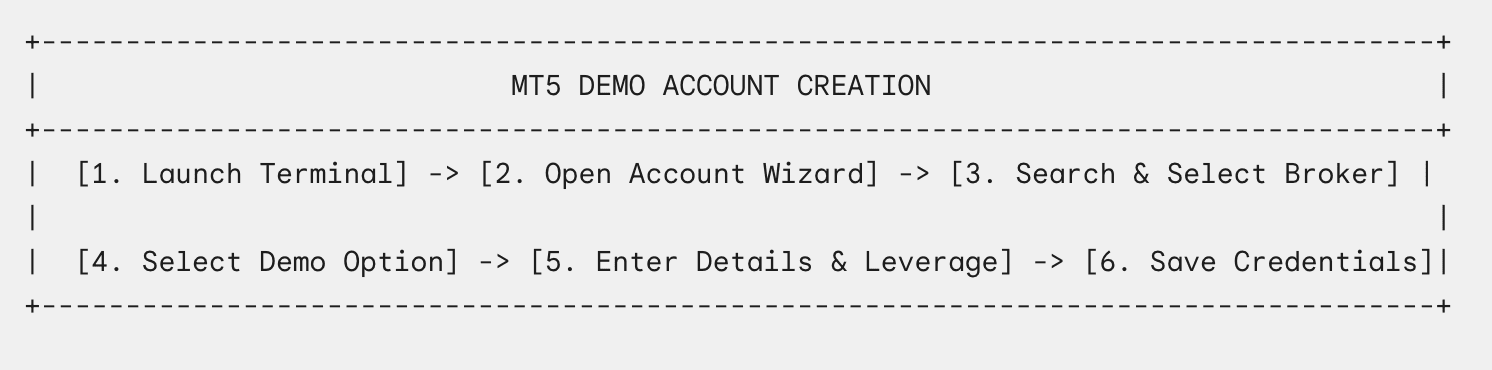
Launch your MetaTrader 5 desktop application. Navigate to the main menu bar located at the top left of the interface, click File, and select Open an Account. Alternatively, right-click on the Accounts header inside the Navigator pane on the left side of the screen and choose Open an Account.
Step 2: Locate and Select Your Financial Service Provider
The setup window displays a searchable list of financial brokerages. In the search box, enter the official name of your preferred broker or broker service. Click Find your company to scan the global server network. Select your broker from the search results list and click Next to proceed.
Step 3: Choose the Demo Registration Path
The system presents options for opening a new demo account, requesting a live account, or connecting to an existing trading account. Select Open a demo account to trade virtual money without risk and click Next.
Step 4: Fill In Profile Specifications and Trading Parameters
Complete the required user information fields in the setup form:
-
Provide your full legal name, a valid email address, and an active phone number.
-
Choose your preferred account structure, selecting between Hedging (which lets you hold opposing positions simultaneously) or Netting (which consolidates trades into a single position).
-
Set your starting virtual balance. Choosing a starting balance similar to your expected live account size creates a more realistic practice environment.
-
Select your preferred account leverage setting, such as 1:100 or 1:500, to match your personal risk management strategy.
Check the agreement box to accept the terms of service, then click Next to submit your registration.
Step 5: Secure Your Generated Credentials and Connect
The terminal processes your registration request with the broker's server and generates your account credentials:
-
Login Number: The unique account identification number assigned to your demo profile.
-
Master Password: The main trader password required to place orders and manage your account.
-
Investor Password: A read-only password that allows others to view your trading activity without execution privileges.
Copy and record these credentials in a secure document. Click Finish to complete the setup process. A confirmation chime will sound in the terminal, indicating your demo account is active and connected to live market feeds.
Maximize the Value of Your Practice Trading
To get the most value out of your demo account, approach it with the same discipline as a live trading account. Trading with unrealistic virtual balances, such as $1,000,000, can build poor position-sizing habits that do not translate well to smaller live accounts. Aligning your demo balance and leverage with your actual capital plan sets realistic expectations.
It is equally important to track your demo trades using a trading journal. Documenting your entry rationale, risk-reward ratios, and emotional reactions helps identify technical mistakes and refine your strategy before transitioning to real funds.
Frequently Asked Questions
Do MetaTrader 5 demo accounts expire after a set period?
In most cases, demo accounts remain active as long as you log in periodically. Many brokers keep demo accounts active indefinitely provided a trade is placed or a login occurs every 30 to 90 days.
Can I top up or reset the virtual funds on my MT5 demo account?
Yes. If your demo balance runs out or you want to adjust your starting amount, most brokers allow you to adjust your virtual funds through their online client portal or by submitting a quick request to customer support.


