




- Published on: 2026-10-06 17:11:27
How to Choose a Social Trading Platform for iOS in 2026

The best social trading platform for iOS isn’t necessarily the one with the slickest screen or the highest-returning traders on display. A phone-friendly interface matters, but so do the performance data behind headline figures and the controls you have over copied positions.
It’s reasonable to want a simple way to follow experienced traders and clear answers about what happens after you tap “copy.” Social trading can mean sharing ideas and analysis, while copy trading automatically replicates another trader’s positions. Neither removes the need to assess risk or make informed decisions.
This guide gives you a consistent checklist for comparing iOS access, trader track records, copy controls, risk tools, fees, and execution. You’ll also learn what mobile access can help you manage, what to review in account terms, and how to take a measured next step without treating copied trades as passive income. TradingPRO offers social and copy trading alongside Rookie, Micro, Pro, and Scalp account tiers. Use the comparison to decide what matters before choosing where to start.
Key Takeaways
- Compare a social trading platform by iOS access, trader data, copy controls, alerts, and account visibility, not by interface alone.
- Distinguish social features for sharing ideas from copy trading, which automatically replicates another trader’s positions.
- Look beyond headline returns. Review the available history and performance across different market conditions.
- Use a practical checklist to define your needs, inspect strategy data, set limits, and review copied activity regularly.
- TradingPRO’s Rookie, Micro, Pro, and Scalp account categories sit alongside its social and copy trading offering.
What a social trading platform for iOS actually needs to do
A social trading platform connects you with other market participants so you can observe strategies, exchange ideas, or follow trading activity. Its value isn’t just that it fits on an iPhone. You also need to understand the information presented, how copied trades work, and which risks remain yours to manage. For a broader overview of the concept, see What is social trading?
Social trading is the sharing and following of market ideas; copy trading is the automatic replication of another trader’s positions when the service supports it. That distinction matters. Following an idea can mean reviewing it and deciding for yourself whether to act. Copying can place trades in your account according to another trader’s activity, subject to the service’s settings and terms.
Social trading, copy trading, and signal following: what is the difference?
Social features may include trader profiles, strategy updates, market commentary, or ways to interact with other participants. These can help you understand how someone approaches the market, but a profile or discussion doesn’t prove that a strategy suits your goals.
A signal is information that may inform your decision. It doesn’t necessarily place a trade. Copy trading is different because positions may be replicated automatically. Before enabling it, understand how copying starts and stops, which positions may be included, and what controls are available. Copied strategies can lose money. Results can change as markets move, and a trader’s past performance doesn’t ensure future outcomes.
What iOS access changes for a trader
Mobile access can make it easier to check account information, review open positions, and receive notifications away from a desktop. The exact functions depend on the platform and whether access is through a native iOS app or a mobile website. Convenience is useful, but it’s only one part of the broader brokerage and trading experience.
A clean interface doesn’t establish execution quality, and a compact performance chart may not show enough detail to assess a strategy. Review the performance history that’s available, the risks attached to the instruments, and the account terms in full. Don’t let a quick notification or an easy-to-tap copy control replace that review.
Think of your phone as an access point, not a decision-making shortcut. Weigh mobile usability alongside trader data, copy settings, execution information, and risk disclosures. That broader view helps you use social features with more control and fewer assumptions.
How to compare social trading platforms on an iPhone
Compare the tasks you can complete, not just the look of the screen. A native iOS app and a mobile website can both provide useful access; neither is automatically better. Test how easily you can find strategy information, review account activity, and understand what will happen before confirming an action. For a social trading platform, visibility and control matter as much as convenience.
Use this checklist to compare platforms consistently:
| What to compare | What to look for on iPhone |
|---|---|
| iOS access | Is access through a native app, mobile web, or both? Are key tasks easy to find and read? |
| Social data | Can you review strategy history and see context beyond a headline return or popularity rank? |
| Copy controls | Are the steps to start, adjust, pause, or stop copying clearly explained before you confirm? |
| Alerts | Can you understand what an alert relates to and find the relevant position or activity? |
| Account visibility | Can you locate balances, open positions, and account activity without confusing menus? |
Then check the interaction details. Text should be readable without repeated zooming, navigation should make important information easy to find, and authentication should fit securely into your normal access. Before taking action, look for a clear summary and confirmation. Claims about “fast” execution, popular traders, or standout performance need context. They don’t explain how results were measured or whether the strategy fits your needs.
Which iOS features make active monitoring easier?
Useful mobile access brings open positions, account activity, strategy information, and alerts within a few clear steps. Check whether notifications identify the event and lead you to relevant details, rather than relying on a vague prompt. Alerts can help you stay informed, but they don’t assess risk or manage a copied position for you. Keep oversight in your hands.
How to compare social data and platform transparency
Look for performance history across meaningful periods, with enough context to interpret returns. Check whether drawdown, trading frequency, and exposure are shown alongside gains. A leaderboard rank is only a snapshot, not evidence that a trader is suitable for you or will perform similarly in future conditions. Prioritize information that helps you judge the strategy, not just its position on a list.
Once you’ve set your comparison criteria, you can review the TradingPRO account setup as part of your broader platform research.
How to assess traders and copy controls before committing
Choose a strategy based on how it behaves under pressure, not just how high its return looks. A social trading platform should give you enough information to judge the approach and enough clarity about copying to understand the exposure you’re taking on. Make risk assessment your starting point, not a final check.
Read performance history beyond headline returns
Check the length of the available track record and whether it spans different market conditions. A short period of strong results may not show how the strategy responds when prices move sharply or conditions change. Compare returns with drawdown, which shows the decline from a peak, and consider volatility, trade frequency, and consistency. Frequent trading or large swings may mean a strategy behaves differently from what a headline figure suggests.
Past performance cannot predict future results. Use historical data to understand how a strategy has behaved, not as a promise of what it will earn next.
Understand control, allocation, and downside exposure
Before enabling automated copying, find out how the service handles allocation. The amount assigned can affect the exposure copied positions create in your account, but the exact mechanics vary. Read how copying starts and whether you can pause or stop it. Understand what happens to existing positions if you do. Check how to monitor open trades and account activity after copying begins.
Set personal limits before you act. Decide what level of loss or exposure you’re prepared to accept, and don’t allocate money you can’t afford to lose. A strategy that performed well in the past can still lose value as markets change. If you follow several traders, their positions may overlap or respond to similar market events. Diversification can spread exposure, but it doesn’t eliminate losses or guarantee a positive result.
- Review the strategy’s history length and behavior across different conditions.
- Compare drawdown, volatility, frequency, and consistency with reported returns.
- Understand allocation, monitoring, and available pause or stop procedures.
- Set your risk boundaries before copying, then review positions regularly.
Make the decision based on evidence and control, not momentum. If the history is too limited to assess or the copying process is unclear, take time to understand the details before committing.
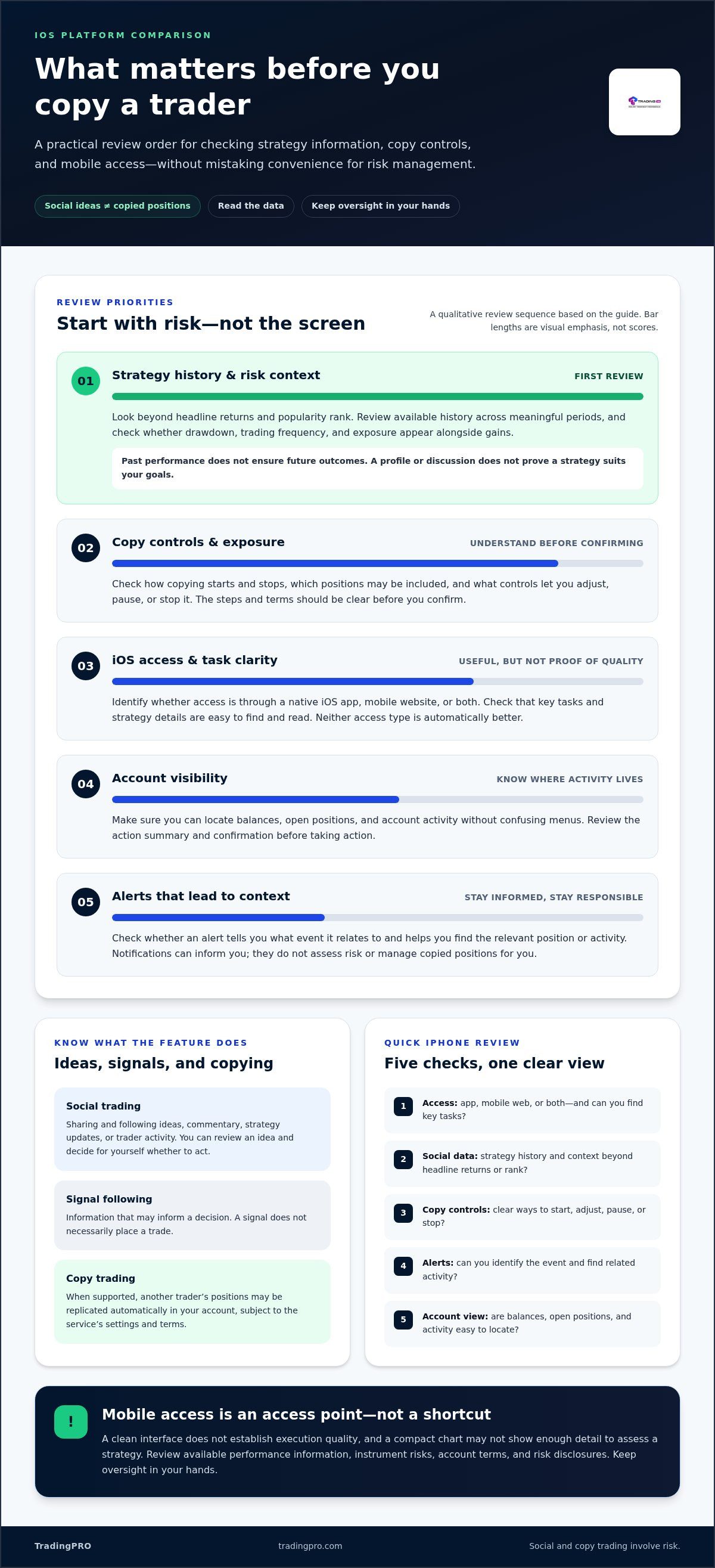
A practical checklist for choosing and using a social trading platform
Use this sequence before funding an account or enabling automated copying. It keeps the decision focused on fit, information, and oversight, rather than convenience alone.
- 1. Define your needs. Decide whether you want to learn from market participants, follow ideas manually, or explore trade replication. Consider your experience, goals, and willingness to monitor activity.
- 2. Compare access. Check how you’ll use the platform from your iPhone, how easily you can view account information, and whether key actions and confirmations are clear.
- 3. Inspect strategy data. Review the available history and assess performance in context, including drawdown, trading frequency, and exposure where shown.
- 4. Set limits. Decide in advance how much exposure you’re willing to take and what level of loss would prompt you to review or stop the activity.
- 5. Review regularly. Monitor positions and strategy changes over time. Don’t assume automation makes trading hands-off.
Account choice is part of the decision, too. TradingPRO offers different account categories, including the Rookie Account overview. Read the account terms, instrument information, and relevant risk disclosures before funding or copying. Understand what the copy settings do and what happens to open positions if you pause or end copying.
Before enabling trade replication
Set a personal exposure limit and decide what loss level would trigger a review. Then check whether the strategy’s approach and trading activity align with your goals and experience. If you can’t explain how copying works or what risks you’re accepting, review the terms before proceeding.
After choosing a platform: monitor with discipline
Review open positions and strategy changes directly. Treat notifications as prompts to check, not as a substitute for oversight. Reassess performance over a suitable period rather than reacting to every short-term move. If activity reaches a limit you set, the strategy changes in a way you don’t understand, or your circumstances shift, pausing or ending copied activity may fit your risk plan. Neither action removes market risk, so consider how open positions are handled.
Take the next step only when you understand the setup and its risks. Create a TradingPRO account to explore the broader brokerage setup and its social and copy trading offering.
How TradingPRO’s social trading fits into a considered platform choice
TradingPRO brings social and copy trading into a broader multi-asset brokerage offering. That context matters: a social trading platform is part of an overall trading setup, where account choice, instruments, terms, and risk information all shape how you use strategy replication. Social features can support how you explore other traders’ approaches, but they don’t make trading risk-free or remove the need for oversight.
Where social trading sits within TradingPRO’s account options
TradingPRO offers four distinct account categories: Rookie, Micro, Pro, and Scalp. Assess each alongside your trading needs. Compare the applicable account information and terms rather than assuming a tier name alone tells you its features or suitability.
Social Trading and Copy Trading are part of this brokerage ecosystem. Before choosing an account or copying a strategy, consider how the account setup relates to your intended activity, the instruments involved, and your own experience. This keeps the decision grounded in the full trading relationship, not just the appeal of following another market participant.
Take the next step with a clear view of risk
Make account information and risk disclosures part of your decision before funding or copying. Read the relevant terms, understand the instruments you may trade, and keep your personal limits in view. If you’re comparing access from an iPhone, assess the mobile experience as one practical consideration. Don’t infer specific app functions or trading controls from the fact that a brokerage offers social trading.
Tools can help you review information and manage decisions, but they can’t remove market risk. Copied positions can lose value, and a strategy’s past results don’t guarantee future performance. Keep monitoring activity and reassess whether it still fits your goals and risk tolerance.
If you’re ready to explore the brokerage setup, register with TradingPRO. Review the account details and applicable risk disclosures first, and remember that trading involves the risk of loss.
Choose your platform with clarity and control
A strong social trading platform should make it easier to assess strategy data, understand how copying works, and stay involved in decisions. Compare trader history beyond headline returns, review available controls, and check account terms and risk disclosures before committing. Mobile access can make information convenient to reach, but it doesn’t replace due diligence or ongoing oversight.
TradingPRO brings Social Trading and Copy Trading into a multi-asset brokerage offering. Its account categories include Rookie, Micro, Pro, and Scalp. Consider how account choice fits your plans, and remember that copied strategies can lose value. No platform tool can guarantee performance or remove trading risk.
Ready to explore the account setup? Register with TradingPRO, review the relevant terms and disclosures, and take your next step at a pace that suits your experience. Stay informed, keep your limits clear, and make each decision your own.
Frequently Asked Questions
What is a social trading platform?
A social trading platform lets users learn from, interact with, or follow other market participants. It may provide trader profiles, strategy updates, commentary, or performance information. Some platforms also offer copy trading, which can automatically replicate another trader’s positions. Social features can help you explore different approaches, but they don’t replace your own research. Check how information is presented and understand the risks before acting on a strategy or copying trades.
Can I use a social trading platform on an iPhone?
Yes, if the platform provides access through an iOS app, a mobile website, or both. Features vary, so check whether you can view account information, open positions, trader data, and relevant alerts on your iPhone. A convenient mobile interface doesn’t guarantee strong execution or complete strategy information. Before choosing, make sure key details are readable and important actions are clearly explained and confirmed.
Is copy trading the same as social trading?
No. Social trading is the broader practice of learning from, interacting with, or following other traders. Copy trading is a specific feature that may automatically replicate another trader’s positions in your account. You can also follow an idea or signal manually, then decide for yourself whether to trade. Before enabling automated copying, understand how it works, what settings are available, and how copied positions may be managed.
How do I choose a trader to copy?
Look beyond headline returns. Review the available performance history and consider drawdown, volatility, trading frequency, and exposure where those details are provided. Check how the strategy has behaved across different market conditions, and decide whether its approach fits your goals and tolerance for losses. A high leaderboard position alone doesn’t establish suitability. Past performance can’t predict future results, so set personal limits before copying.
Are social trading platforms safe for beginners?
Social trading features may help beginners observe how other market participants discuss or approach trading, but they don’t make trading safe or remove the risk of loss. Copying a strategy can expose your account to market movements and losses. Start by learning how the platform works, reviewing account terms and risk disclosures, and deciding what you can afford to risk. Don’t treat automated copying as hands-off investing.
Does copy trading guarantee profits?
No. Copy trading doesn’t guarantee profits, and copied positions can lose value as market conditions change. A trader’s past returns are not a promise of future performance. Before copying, review the strategy’s history and risk information, understand how allocation affects your exposure, and set personal limits. Continue monitoring activity after copying begins. Automation can replicate trades, but it can’t remove market uncertainty or make decisions risk-free.
What should I compare when choosing an iOS trading app?
Compare whether access is through a native iOS app or mobile web, then assess how clearly each option presents account information, strategy data, alerts, and open positions. Check navigation, readability, authentication, and whether key actions are clearly confirmed. For a social trading platform, also assess the depth and context of trader performance data and the available copy controls. Don’t assume a polished interface proves execution quality or strategy suitability.
Can I stop copying a trader whenever I want?
That depends on the platform’s terms and copy-trading process. Before starting, find out how to pause or stop copying and what happens to positions already open in your account. Stopping future replication may not automatically close existing trades. Review the relevant controls and terms, and decide in advance what changes in performance, exposure, or personal circumstances would prompt you to reassess or end the activity.


